.webp)

Interweave Technologies
%201.avif)
May 28, 2026
%201%20(1).avif)
3 min
Which is a BYOD Security Best Practice

A BYOD security best practice is creating a clear, written policy that defines which devices can access company data, requires multi-factor authentication, enforces encryption, and separates personal data from business data on every employee device. Without these protections, personal devices become open doors to data breaches, compliance failures, and costly downtime. This article explains what BYOD security is, the top best practices every business needs, the biggest risks to watch for, and how companies in Huntsville, Alabama can protect their networks while still giving employees the flexibility to work on their own devices.
What Is BYOD Security and Why Does It Matter?
BYOD security is the set of policies, tools, and practices that organizations use to protect company data when employees use their personal smartphones, laptops, and tablets for work. It matters because personal devices now touch nearly every business network in the country, and each one is a potential entry point for hackers.
The numbers tell the story. According to Venn's 2025 BYOD security report, over 95% of organizations now allow employees to use personal devices for work. By late 2024, 67% of companies had formal BYOD policies in place, up from just 51% in 2023. The global BYOD market reached $153.1 billion in 2025 and is projected to grow to $619.5 billion by 2034, according to ElectroIQ.
But with that growth comes real danger. The annual Virtual Mobile Infrastructure (VMI) Report found that approximately 48% of organizations have suffered data breaches linked to unsecured or unmanaged personal devices. That is nearly half of all businesses. For companies in Huntsville, Alabama that handle sensitive government data, patient health records, or financial information, an unsecured personal device is not just an IT problem. It is a compliance violation waiting to happen.
BYOD security is not about banning personal devices. That ship has sailed. It is about putting the right protections in place so employees can work on their own devices without putting the business at risk. Companies that invest in managed IT services with advanced security can build a BYOD framework that protects data while keeping employees productive.
What Are BYOD Best Practices?
BYOD best practices are the proven security measures that businesses use to protect company data on personal devices. The most important best practices include writing a clear BYOD policy, requiring multi-factor authentication (MFA), enforcing device encryption, using Mobile Device Management (MDM) software, separating personal and work data, training employees on security risks, and having a plan for lost or stolen devices.
According to Keeper Security, a strong BYOD policy should require employees to register their devices with IT, install approved security software, and follow rules about which apps can and cannot be used for work. The policy should also spell out what happens when an employee leaves the company, including how business data is removed from their personal device.
Multi-factor authentication is one of the simplest and most effective protections. NordLayer reports that strong passwords alone are not enough when data breaches cost an average of $4.9 million each. MFA adds a second layer of verification, like a code sent to a phone, that makes it much harder for attackers to break in even if they steal a password.
Encryption is another non-negotiable practice. Every device that touches company data should encrypt that data at rest and in transit. This is especially important for businesses in Huntsville that handle Controlled Unclassified Information under CMMC or protected health information under HIPAA.
Businesses across North Alabama that need help building a complete BYOD security strategy can start with a cybersecurity risk assessment to identify where their current vulnerabilities are.
What Are the Security Risks of BYOD?
The security risks of BYOD are data leakage, malware infections, lost or stolen devices, unsecured Wi-Fi connections, shadow IT, and the mixing of personal and business data on a single device.
Data leakage is the number one concern. According to Sci-Tech Today's 2025 BYOD statistics report, 64% of cybersecurity professionals identify data loss and leakage as their main BYOD-related worry. Personal devices often have cloud storage apps, messaging platforms, and email accounts that can accidentally or intentionally move company data to unsecured locations.
Lost and stolen devices are a constant threat. ConnectWise reports that over 60% of network breaches are connected to a lost or stolen device. If a personal phone or laptop containing company emails, files, or login credentials goes missing, and the device is not encrypted or remotely wipeable, the business faces a potential data breach.
Shadow IT is another major risk. Lookout's research found that 43% of remote employees use personal devices instead of company-issued equipment, and 60% admit to sending work emails to personal accounts. When employees use unapproved apps and services on their personal devices, IT teams lose visibility and control over where company data goes.
For businesses in Huntsville that work with defense contracts, healthcare records, or financial data, these risks are magnified by strict compliance requirements. A single BYOD-related breach can trigger HIPAA fines, CMMC assessment failures, or PCI DSS penalties. The right compliance-driven IT solution can help businesses identify and manage these risks before they become incidents.
Which of the Following Is a Key BYOD Security Best Practice?
A key BYOD security best practice is enforcing multi-factor authentication (MFA) on every personal device that accesses company resources. MFA is considered the single most impactful security control for BYOD environments because it stops unauthorized access even when passwords are stolen or weak.
According to Sci-Tech Today's BYOD statistics, about 45% of employees fail to update their passwords even after a data breach. That means stolen credentials remain usable for weeks or months after an attack. MFA blocks this by requiring a second form of verification, such as a fingerprint scan, a code from an authenticator app, or a push notification to a trusted device.
The IBM Cost of a Data Breach Report 2025 found that stolen or compromised credentials remain one of the top initial attack vectors for breaches. With MFA in place, a stolen password alone is not enough to get into a system. This one practice can stop a large percentage of unauthorized access attempts before they start.
For defense contractors and healthcare organizations in Huntsville, Alabama, MFA is not just a best practice. It is a compliance requirement. NIST SP 800-171 requires identification and authentication controls that include MFA for network access to privileged and non-privileged accounts. HIPAA's Security Rule requires authentication measures to verify that a person seeking access to ePHI is who they claim to be.
Businesses that want to implement MFA across their entire network, including BYOD devices, benefit from working with a provider that offers managed IT department services with centralized authentication management.
What Are the BYOD Policy Measures?
BYOD policy measures are the specific rules, requirements, and technical controls that a business puts in writing to govern how personal devices interact with company systems. A strong BYOD policy should include acceptable use guidelines, device registration requirements, security software mandates, data separation rules, remote wipe authorization, and an exit procedure for when employees leave.
According to ConnectWise, a BYOD policy should define exactly what IT can and cannot access on a personal device. For example, the company may monitor work-related apps and emails but not personal photos, messages, or browsing history. This transparency builds trust and encourages employee buy-in.
Device registration is essential. Every personal device that accesses company resources should be registered with IT so the team knows exactly which devices are on the network. Venn's 2025 BYOD report notes that even in companies with BYOD restrictions, 78% of IT and security leaders say employees still use personal devices without approval, creating a massive unmanaged attack surface.
The policy should also address what happens to company data when an employee leaves. Passwords need to be changed immediately. Company apps and data need to be removed from the personal device. Without a clear exit process, former employees retain access to sensitive information, which is a serious risk.
For businesses in Huntsville that need to comply with CMMC, HIPAA, or PCI DSS, the BYOD policy must be documented, enforced, and reviewed regularly. It becomes part of the audit record. Companies working toward government contract compliance should make sure their BYOD policy aligns with every applicable control in NIST SP 800-171.
What Are the 5 Basic Principles of Security?
The 5 basic principles of security are confidentiality, integrity, availability, authentication, and accountability. These principles form the foundation of every cybersecurity framework and apply directly to BYOD security.
Confidentiality means only authorized people can access sensitive data. In a BYOD context, this means encrypting data on personal devices, restricting access by role, and using containerization to keep business data separate from personal files.
Integrity means data cannot be changed or tampered with by unauthorized users. For BYOD, this involves ensuring that company files on personal devices remain accurate and unaltered, which requires endpoint protection and access controls.
Availability means authorized users can access the data and systems they need when they need them. A BYOD strategy must balance security with productivity so that security controls do not lock employees out of the tools they need to do their jobs.
Authentication means verifying the identity of every user and device before granting access. MFA, biometrics, and certificate-based authentication are all tools used in BYOD environments.
Accountability means tracking who did what and when. Logging and audit trails on BYOD devices help businesses monitor for suspicious activity and demonstrate compliance to regulators.
These five principles map directly to the requirements in HIPAA, CMMC, PCI DSS, and other compliance frameworks. Businesses in North Alabama that apply these principles consistently across both company-issued and personal devices build a security posture that holds up under audits and attacks. A strong enterprise software and applications solution can help enforce these principles across all devices.
What Are the 4 Types of Security?
The 4 types of security that apply to BYOD environments are network security, endpoint security, application security, and data security.
Network security protects the pathways that data travels on. For BYOD, this includes using VPNs for remote connections, segmenting the network so personal devices cannot access sensitive internal systems, and implementing firewalls and intrusion detection. According to the VMI Report, 48% of organizations point to network security gaps as a top BYOD concern.
Endpoint security protects the devices themselves. This means installing antivirus software, enforcing operating system updates, and using MDM tools to manage security settings on personal phones, tablets, and laptops. Sci-Tech Today reports that about 53% of companies experienced mobile security incidents that caused data loss or system downtime in 2024.
Application security protects the software employees use. In a BYOD environment, this means controlling which apps can access company data, blocking unapproved third-party apps, and using Mobile Application Management (MAM) to manage business apps separately from personal ones.
Data security protects the information itself, no matter where it lives. Encryption, data loss prevention (DLP) tools, and remote wipe capabilities all fall under data security. If a device is lost, encrypted data remains unreadable, and remote wipe can erase business information without touching personal files.
For businesses in Huntsville, all four types of security must work together. A weakness in any one area can undermine the others. Companies that rely on enterprise wireless network solutions need to make sure those networks are segmented and secured for BYOD access.
What Is a Good Practice for Securing BYOD Devices?
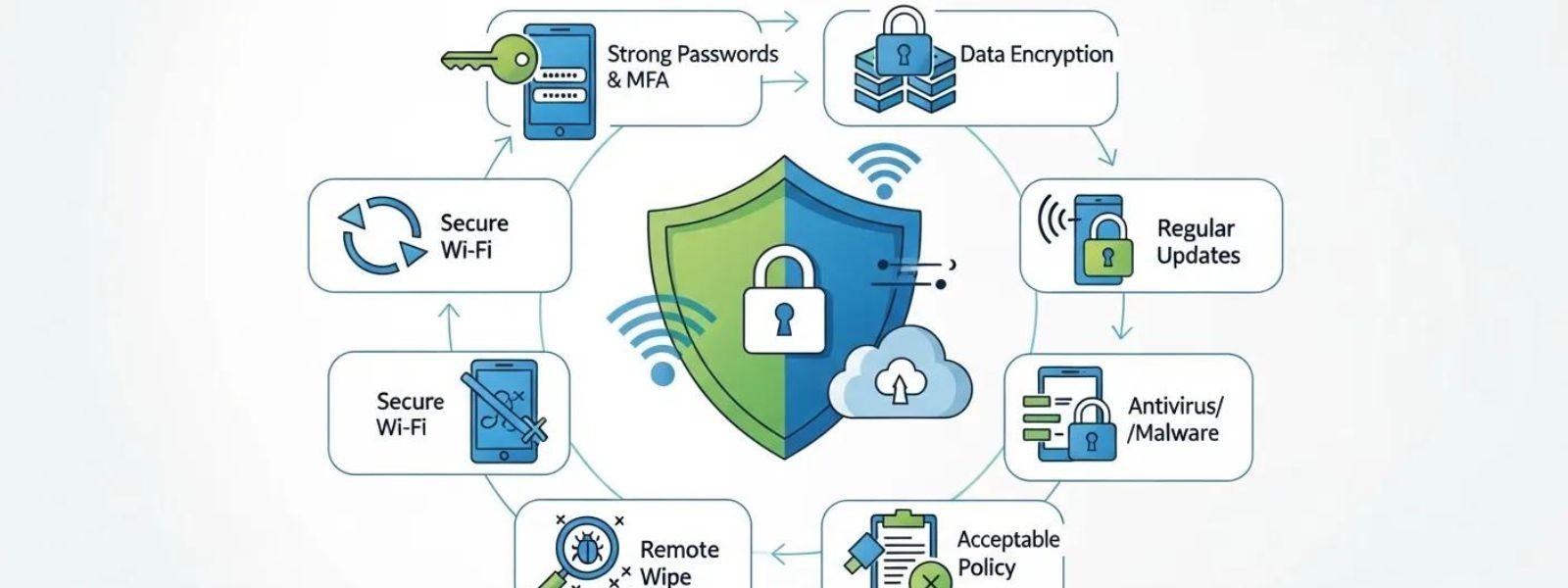
A good practice for securing BYOD devices is using containerization to separate business data from personal data on the same device. Containerization creates an encrypted, isolated workspace on the personal device where all company apps, files, and communications live. The business container is managed and protected by IT, while the personal side of the device stays private and untouched.
According to Venn's 2025 research, containerization solves one of the biggest challenges in BYOD security: protecting company data without invading employee privacy. Employees do not want their employer reading their personal texts or browsing their photos. Employers need to protect company data and meet compliance requirements. Containerization satisfies both needs.
If a device is lost or stolen, IT can remotely wipe the business container without erasing personal photos, contacts, or apps. If an employee leaves the company, the business container is removed, and the employee keeps their personal device intact. This clean separation is especially important for compliance. Under HIPAA, for example, protected health information on a personal device must be encrypted and remotely wipeable. Under CMMC, any device that touches CUI is in scope for assessment, so keeping CUI contained in a managed workspace is critical.
Businesses in Huntsville that serve the defense, healthcare, or financial sectors should consider containerization as a core part of their BYOD strategy. Combined with MDM and MFA, it creates a layered defense that protects data at every level.
What Are the 5 Best Practices for Securing a Wireless Network?
The 5 best practices for securing a wireless network in a BYOD environment are using WPA3 encryption, segmenting the network, hiding the SSID, requiring authentication for all connections, and monitoring network traffic in real time.
WPA3 is the latest wireless security protocol and provides stronger encryption than its predecessor, WPA2. Every business wireless network should be upgraded to WPA3 to protect data in transit between personal devices and the network.
Network segmentation means creating separate wireless networks for different purposes. Guest devices and personal BYOD devices should connect to a separate network that is isolated from critical business systems. This limits the damage if a personal device is compromised.
Hiding the SSID (the network name) prevents casual discovery of the business network. While this is not a strong defense on its own, it adds one more layer that attackers must work through.
Requiring authentication means every device that connects to the wireless network must be verified. This can be done through certificates, usernames and passwords, or integration with an MDM system.
Real-time monitoring means watching network traffic for unusual activity, such as large file transfers, connections to known malicious IP addresses, or devices behaving in unexpected ways. According to Forcepoint, software-defined networking tools provide detailed analytics on what is happening across the entire wireless environment.
Huntsville businesses that support remote workers, BYOD policies, or multiple office locations need wireless networks that are secure and compliant. Providers that offer structured cabling and network solutions can build the physical and wireless infrastructure needed to support a secure BYOD environment.
What Are the 5 C's in Security?
The 5 C's in security are change, compliance, cost, continuity, and coverage. These five concepts help businesses evaluate and strengthen their overall security posture, especially in BYOD environments.
Change refers to the constantly evolving threat landscape. New malware, phishing techniques, and attack methods appear every day. A BYOD security strategy must adapt through regular policy updates, software patches, and employee training.
Compliance means meeting the regulatory requirements that apply to the business. For companies in Huntsville, this could include CMMC for defense contractors, HIPAA for healthcare providers, PCI DSS for businesses that accept credit cards, or financial industry compliance requirements.
Cost refers to the financial impact of both security investments and security failures. According to IBM's 2025 Cost of a Data Breach Report, the global average breach cost was $4.44 million. For U.S. businesses, it averaged $10.22 million. Investing in BYOD security is far cheaper than paying for a breach.
Continuity means keeping the business running during and after a security incident. If a BYOD device is compromised, the business needs to contain the damage, recover data, and continue operations without major disruption.
Coverage refers to making sure security protections extend to every device, network, and application in the organization. With BYOD, coverage is especially challenging because IT does not own or fully control the devices. MDM tools, containerization, and zero-trust architecture all help extend coverage to personal devices.
How Does BYOD Affect Compliance With HIPAA and CMMC?
BYOD affects compliance with HIPAA and CMMC by expanding the scope of what must be protected and monitored. Any personal device that accesses protected health information (under HIPAA) or Controlled Unclassified Information (under CMMC) becomes subject to the full set of security controls required by those frameworks.
Under HIPAA, the Security Rule requires covered entities to implement technical safeguards for all devices that store or transmit ePHI. This includes encryption, access controls, audit logs, and the ability to remotely wipe data from lost devices. If an employee accesses patient records on a personal phone, that phone must meet every one of these requirements. According to the HIPAA Journal, hacking-related healthcare breaches increased by 239% between 2018 and 2023, and personal devices are a growing attack vector.
Under CMMC, the rules are even stricter. According to Totem Technologies, BYOD is not explicitly forbidden by CMMC. However, any personal device that processes, stores, or transmits CUI is considered in scope for assessment. That means the device must meet all applicable NIST SP 800-171 controls, including encryption, access control, audit logging, and incident response. For CMMC Level 2, that is 110 security controls, and every one must be fully implemented on in-scope devices.
For defense contractors in Huntsville and across North Alabama, this creates a real challenge. Allowing employees to check work email on their personal phones might seem harmless, but if those emails contain CUI, the phone is now in scope for a CMMC assessment. Companies need clear policies that either restrict CUI access on personal devices or bring those devices fully under managed security controls.
A complete compliance as a managed service approach helps businesses navigate these complexities by building security controls that cover both company-issued and personal devices.
Which Best Practice Can Help Mitigate Security Risks Associated With BYOD?
The best practice that can help mitigate the most security risks associated with BYOD is implementing a zero-trust security model. Zero trust assumes that no device, user, or connection is trustworthy by default, even if it is inside the company network. Every access request is verified before it is granted.
According to NordLayer's 2025 BYOD trends report, zero-trust architecture is the most significant security shift happening in BYOD environments right now. Instead of trusting a device simply because it is on the company network, zero trust checks every request against identity, device health, location, and behavior patterns before allowing access.
The VMI Report found that 90% of North American organizations believe zero trust aligns with their BYOD security goals. Zero trust works especially well for BYOD because personal devices are inherently less controlled than company-issued ones. Instead of trying to manage every aspect of a personal device, zero trust focuses on verifying each access attempt and limiting what each device can reach.
In practice, zero trust for BYOD means requiring MFA for every login, limiting access based on job role (least-privilege access), continuously monitoring device behavior, and immediately revoking access if something looks suspicious.
For businesses in Huntsville working with defense contracts, a zero-trust approach helps satisfy multiple NIST SP 800-171 controls at once, including access control, identification and authentication, and system and communications protection. It is one of the most efficient ways to strengthen BYOD security while maintaining compliance.
What Are the Top 3 Security Systems?
The top 3 security systems for managing BYOD in a business environment are Mobile Device Management (MDM), Endpoint Detection and Response (EDR), and Data Loss Prevention (DLP).
MDM gives IT teams centralized control over every device that connects to the company network. MDM tools can enforce encryption, require password strength, push security updates, and remotely lock or wipe a device if it is lost or stolen. According to ElectroIQ, Mobile Device Management holds a 41.5% market share in the BYOD security space.
EDR goes beyond basic antivirus by continuously monitoring endpoints for suspicious behavior. If a personal device starts behaving unusually, such as connecting to a known malicious server or transferring large amounts of data, EDR can detect and respond to the threat in real time. According to ConnectWise, EDR software helps identify and respond to malicious behavior from BYOD endpoints.
DLP tools monitor and control the flow of sensitive data. They can block employees from copying company files to a personal USB drive, sending confidential information through a personal email account, or uploading protected data to an unapproved cloud service. For businesses that handle regulated data, DLP is a compliance requirement, not just a best practice.
Businesses in Huntsville that need all three systems working together should consider a provider that delivers business managed IT services with integrated MDM, EDR, and DLP as part of a unified security platform.
BYOD Security Risks and Solutions: A Quick Comparison
| BYOD Security Risk | Impact | Best Practice Solution |
|---|---|---|
| Lost or stolen device | Data breach, compliance violation | Remote wipe, device encryption, MDM |
| Unsecured Wi-Fi | Man-in-the-middle attacks, data interception | VPN, network segmentation, WPA3 |
| Shadow IT (unapproved apps) | Data leakage, loss of IT visibility | Application whitelisting, MAM, employee training |
| Weak or reused passwords | Credential theft, unauthorized access | MFA, password managers, security training |
| Mixing personal and work data | Accidental data exposure, compliance failure | Containerization, data separation policies |
| Outdated software and OS | Exploitable vulnerabilities | MDM-enforced updates, patch management |
| Employee leaves company | Retained access to company data | Exit procedures, remote wipe, credential revocation |
Sources: Venn BYOD Security Report 2025, VMI Annual Report, Lookout State of Remote Work Security, ConnectWise BYOD Risk Report, IBM Cost of a Data Breach Report 2025
Frequently Asked Questions
Do Businesses in Huntsville Need a Written BYOD Policy?
Yes, businesses in Huntsville need a written BYOD policy if employees use personal devices for any work-related task. A written policy sets clear rules for device registration, acceptable use, security requirements, and what happens when a device is lost or an employee leaves. According to Venn's 2025 research, 78% of employees use personal devices without IT approval even in companies with BYOD restrictions. A written policy backed by technical controls is the only way to manage this risk. Huntsville companies working with defense contracts or healthcare data face additional requirements under CMMC and HIPAA that make a documented BYOD policy essential.
Can BYOD Devices Be Used for CMMC Compliance?
Yes, BYOD devices can be used in CMMC-compliant environments, but with significant restrictions. According to Totem Technologies, CMMC does not explicitly forbid BYOD. However, any personal device that processes, stores, or transmits Controlled Unclassified Information is in scope for assessment and must meet all applicable NIST SP 800-171 controls. For many Huntsville defense contractors, this means either restricting CUI access to company-issued devices or implementing managed security solutions that bring personal devices fully into compliance.
What Is the Biggest Security Threat From BYOD Devices?
The biggest security threat from BYOD devices is data leakage. According to Sci-Tech Today's 2025 BYOD statistics, 64% of cybersecurity professionals identify data loss and leakage as their top BYOD-related concern. Personal devices often have unsecured apps, personal cloud storage, and messaging platforms that can move company data to locations outside of IT's control. Encryption, containerization, and data loss prevention tools are the most effective ways to address this threat.
How Often Should a BYOD Security Policy Be Updated?
A BYOD security policy should be updated at least once a year, or whenever there is a major change in the threat landscape, company structure, or regulatory requirements. According to Venn's BYOD research, policy reviews should involve IT, HR, legal, and business stakeholders to capture both technical and operational needs. For businesses in Huntsville, annual policy reviews also help maintain audit readiness for CMMC, HIPAA, and other compliance frameworks.
Does BYOD Increase the Cost of a Data Breach?
Yes, BYOD can increase the cost of a data breach. According to IBM's Cost of a Data Breach Report, remote work was a factor in breaches that cost an average of $131,000 more than breaches without a remote work component. Personal devices that are not managed by IT create blind spots that slow down breach detection and containment. The VMI Report found that 48% of organizations have already suffered BYOD-related breaches. Investing in MDM, encryption, and zero-trust architecture reduces the likelihood and cost of a BYOD-related breach.
What Should Happen When a BYOD Employee Leaves the Company?
When a BYOD employee leaves the company, all company data should be removed from their personal device immediately. Passwords and access credentials should be changed, VPN access should be revoked, and the device should be deregistered from the MDM system. If containerization is in place, IT can wipe the business container without touching personal data. According to Keeper Security, transitional protocols should be part of every BYOD policy and communicated to all employees from day one.
Can Interweave Technologies Help With BYOD Security in Huntsville?
Yes, Interweave Technologies helps businesses in Huntsville, Alabama with BYOD security as part of their managed IT and compliance services. With over 20 years of experience and certifications across CMMC, HIPAA, PCI DSS, ISO, and more, Interweave builds BYOD security strategies that include MDM deployment, encryption, MFA, network segmentation, and compliance documentation. Their Complete Compliance as a Managed Service program covers BYOD security within a broader framework that protects businesses across multiple regulatory requirements.
Final Thoughts
BYOD is not going away. With over 95% of organizations allowing personal devices for work and the global BYOD market growing past $153 billion, the question is no longer whether to allow BYOD. The question is how to secure it. The best practices are clear: write a strong policy, enforce MFA and encryption, use MDM and containerization, train employees, and adopt a zero-trust mindset. Every one of these steps reduces risk, strengthens compliance, and protects the business from the kind of breach that can cost millions.
For businesses in Huntsville, Alabama and across North Alabama, BYOD security is directly tied to compliance. Whether a company handles defense contracts under CMMC, patient data under HIPAA, or payment card information under PCI DSS, personal devices that touch that data must be secured. The cost of a single BYOD-related breach, both in dollars and in lost contracts, far exceeds the cost of getting security right from the start.
Interweave Technologies has been helping businesses across Huntsville and North Alabama meet their IT, cybersecurity, and compliance needs since 2005. Their team understands the unique challenges that defense contractors, healthcare providers, manufacturers, and financial services companies face with BYOD security. If your business needs help building a secure BYOD framework that meets your compliance requirements, schedule a free scoping audit with the Interweave team today. Take control of BYOD security before a breach takes control of your business.


.webp)



Share Post