

Interweave Technologies

November 15, 2026

12 min
Is an AI Chatbot Worth It for a Small Business?

Yes, an AI chatbot for small business pays off when it answers questions your staff already repeat every single week. The U.S. Census Bureau found 17% to 20% of businesses used AI between December 2025 and May 2026. Entry plans with AI answers run about $29 to $95 a month. The real cost is setup time and a monthly review by a named owner on your team.
Key Takeaways
- A chatbot pays off when it removes a repeated task, such as hours, pricing, or appointment requests.
- Entry plans with AI answers cost about $29 to $95 a month, according to a 2026 vendor pricing guide.
- The Federal Trade Commission (FTC) states there is no AI exemption from the laws on the books.
- IBM found 97% of organizations with an AI breach had no AI access controls in place.
- A 30-day pilot with one goal and a human handoff tests the value before a wider rollout.
Is an AI Chatbot for Small Business Worth It?
An AI chatbot is worth it for a small business when it removes a repeated task like answering hours or pricing. The payback comes from staff hours saved against a monthly plan price. A chatbot that answers no repeated question adds cost without a return.
Owners who want a second opinion on fit can talk with a team that plans an AI chatbot setup around one goal. The sections below cover cost, payback, safety, and the steps to launch.
The cost and payback numbers come first, because they decide whether a pilot is worth running.
What Is an AI Chatbot and How Does It Work?
An AI chatbot is a software assistant that reads a typed question and writes an answer in plain language. A generative model, called a large language model (LLM), produces the reply. The model draws on text you supply, such as your FAQ page and service list.
Many owners search "what is ai chatbot" before they buy, and the short answer is a trained question-and-answer tool. Retrieval-augmented generation (RAG) lets the bot look up your documents first and then write from them. A good bot also hands the chat to a person when it cannot answer.
The type of bot sets both the risk and the price, so cost is the next question.
How Much Does an AI Chatbot Cost for a Small Business?
A small business pays $0 for free live chat and about $29 to $95 a month once AI answers are added. That range comes from a 2026 pricing guide published by a chatbot vendor. Annual billing lowers the monthly price on many plans.
The table below shows the cost layers an owner should compare, with the staff wage as a yardstick.
| Cost layer | Figure | Source |
|---|---|---|
| Free live chat, no AI answers | $0 per month | 2026 vendor pricing guide |
| Entry plan with AI answers | About $29 to $95 per month | 2026 vendor pricing guide |
| Customer service representative wage | $21.53 per hour median | Bureau of Labor Statistics (BLS), May 2025 |
| Setup and monthly review | Staff time you schedule | Your own calendar |
The last row matters because a plan price leaves out the hours spent loading answers and reading chat logs. The next section turns these figures into a payback test.
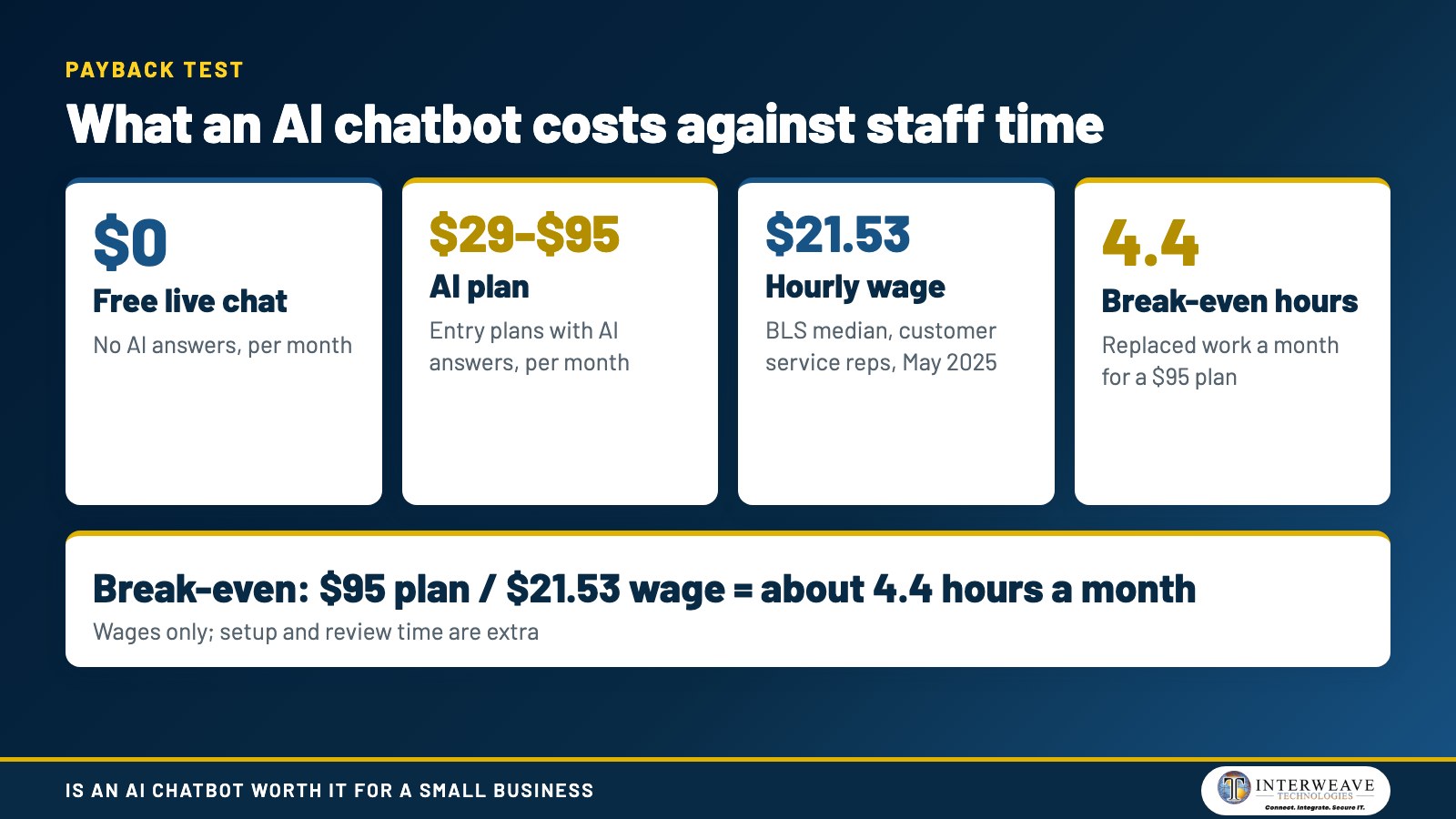
The graphic above shows the plan price range next to the median wage and the break-even hours.
How Does an AI Chatbot Pay Back for a Small Business?
An AI chatbot pays back when the staff time it replaces costs more than the plan. The BLS reports a median wage of $21.53 per hour for customer service representatives in May 2025. A $95 plan then breaks even at about 4.4 hours of replaced work a month.
That math covers wages only and leaves out benefits, setup, and review time for an AI chatbot for small business teams. Census Bureau worker data adds support: 31% of workers who used AI in the last week saved one to two hours.
A small team can run the same test on its own inbox by counting how many identical questions arrive each week. Payback depends on volume, so the benefits come next.
What Are the Benefits of an AI Chatbot for a Small Business?
The main AI chatbot benefits for a small business are faster replies, after-hours coverage, and fewer repeated questions for staff. Each benefit ties to a task the bot can finish without a person. The list below names five.
- Instant answers to hours, location, and service questions at any time of day.
- Lead capture that records a name, need, and contact detail before a visitor leaves.
- Appointment requests routed to a calendar or a staff inbox.
- Consistent wording, because the bot draws on one approved set of answers.
- Chat logs that show which questions customers ask repeatedly.
These benefits hold only for questions the bot has approved answers for, which leads to customer service.
Can an AI Chatbot Handle Customer Service for a Small Business?
Yes, an AI chatbot for customer service can handle routine questions, but a person must take over complex or sensitive cases. Routine questions include hours, pricing, order status, and booking. Refunds, complaints, and urgent problems belong with staff.
A handoff rule sends the chat and its history to a named person or inbox. Teams that link the bot to a ticket queue can add support automation so each escalation has an owner.
The Bureau of Labor Statistics projects customer service representative employment to decline 5 percent from 2025 to 2035. Small teams still need a person for the cases a bot passes along, so examples of safe bot work come next.
What Is an Example of an AI Chatbot for a Small Business?
A common AI chatbot example is a website bot that answers service questions and books a consultation. The bot reads the owner's approved pages and replies in the visitor's words. It records the lead and passes the details to staff.
Three small business examples show the pattern:
- A contractor bot asks the project type and city, then offers a call time.
- A dental or medical front desk bot answers hours and insurance questions and sends clinical questions to staff.
- A retail bot reports order status from a connected store system.
Each example stays inside one job, which is why task scope is the next topic.
What Tasks Can an AI Bot for Small Business Handle?
An AI bot for small business can handle question answering, lead capture, booking, and simple follow-up. The task must have a clear rule and a known answer. Open-ended judgment calls stay with people.
The AI chatbot ideas below suit a first pilot, listed from lowest to highest risk:
- Answer hours, directions, and service-area questions.
- Explain the steps of a service, from quote to delivery.
- Collect contact details and the reason for the visit.
- Book or reschedule appointments through a connected calendar.
- Pass the chat to staff when the visitor asks for a person.
Bots that pass data into other systems link to workflow automation, such as a CRM record created from each chat. The type of bot you pick shapes how reliably it follows these rules.
Which AI Chatbot Fits a Small Business?
The right AI chatbot fits one job, one data source, and one handoff path, and the bot type sets how it answers. Rules-based bots follow scripts, generative bots write replies, and hybrids mix both. The table compares the three types.
| Type | How it answers | Main risk |
|---|---|---|
| Rules-based | Follows fixed scripts and buttons | Fails on questions outside the script |
| Generative | Writes a new reply with an LLM | Can state wrong answers with confidence |
| Hybrid | Uses scripts for key steps and an LLM for open questions | Needs rules for when each part answers |
Rules-based bots carry the least risk of invented answers, and generative bots cover the widest range of questions. A hybrid keeps scripts for prices and policies. Any vendor should show where answers come from, how handoff works, and who can read the chat logs.
A shortlist built on those three checks keeps the pilot small, so the setup steps follow.
How Do You Set Up an AI Chatbot for a Small Business?
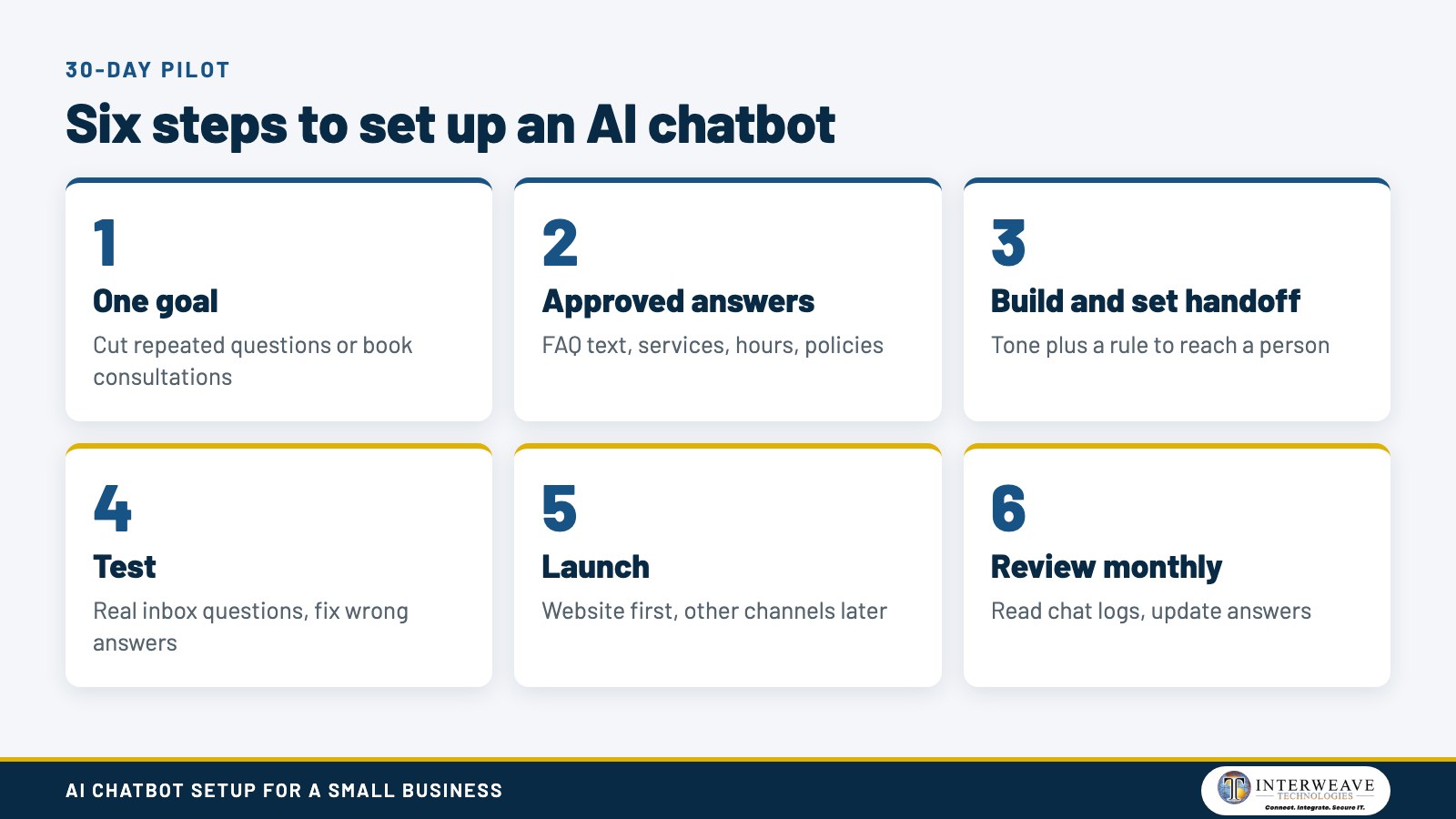
Set up an AI chatbot for a small business in six steps, starting with one measurable goal. AI chatbot setup for small businesses works well as a 30-day pilot with a single channel. The steps below follow that order.
- Pick one goal, such as cutting repeated email questions or booking more consultations.
- Gather approved answers: FAQ text, service pages, hours, and policies.
- Build the bot, set its tone, and write the rule for handing chats to a person.
- Test with real questions from your inbox and fix every wrong answer.
- Launch on the website, then add other channels later.
- Review chat logs every month and update the answers.
The graphic shows the six steps in order, with the owner decision at each stage.
A team that wants help with design, content loading, and handoff rules can review business chatbot options before starting. Data handling needs attention before launch, so safety is next.
Is an AI Chatbot Safe for Customer Data?
An AI chatbot is safe for customer data only when access controls, data limits, and vendor terms are set before launch. IBM's 2025 report found 13% of organizations reported breaches of AI models or applications. Of those, 97% had no AI access controls in place.
Three controls reduce the exposure. The first is a rule on what customers may type, such as no card numbers or health details. The second is limiting who can read chat logs, which follows role-based access principles. The third is a named vendor contract that states how chat data is stored and used.
IBM's 2025 report also puts the U.S. average breach cost at $10.22 million, so a chatbot that touches sensitive data belongs in the security plan. A written plan for a data breach response covers chat systems the same way it covers email.
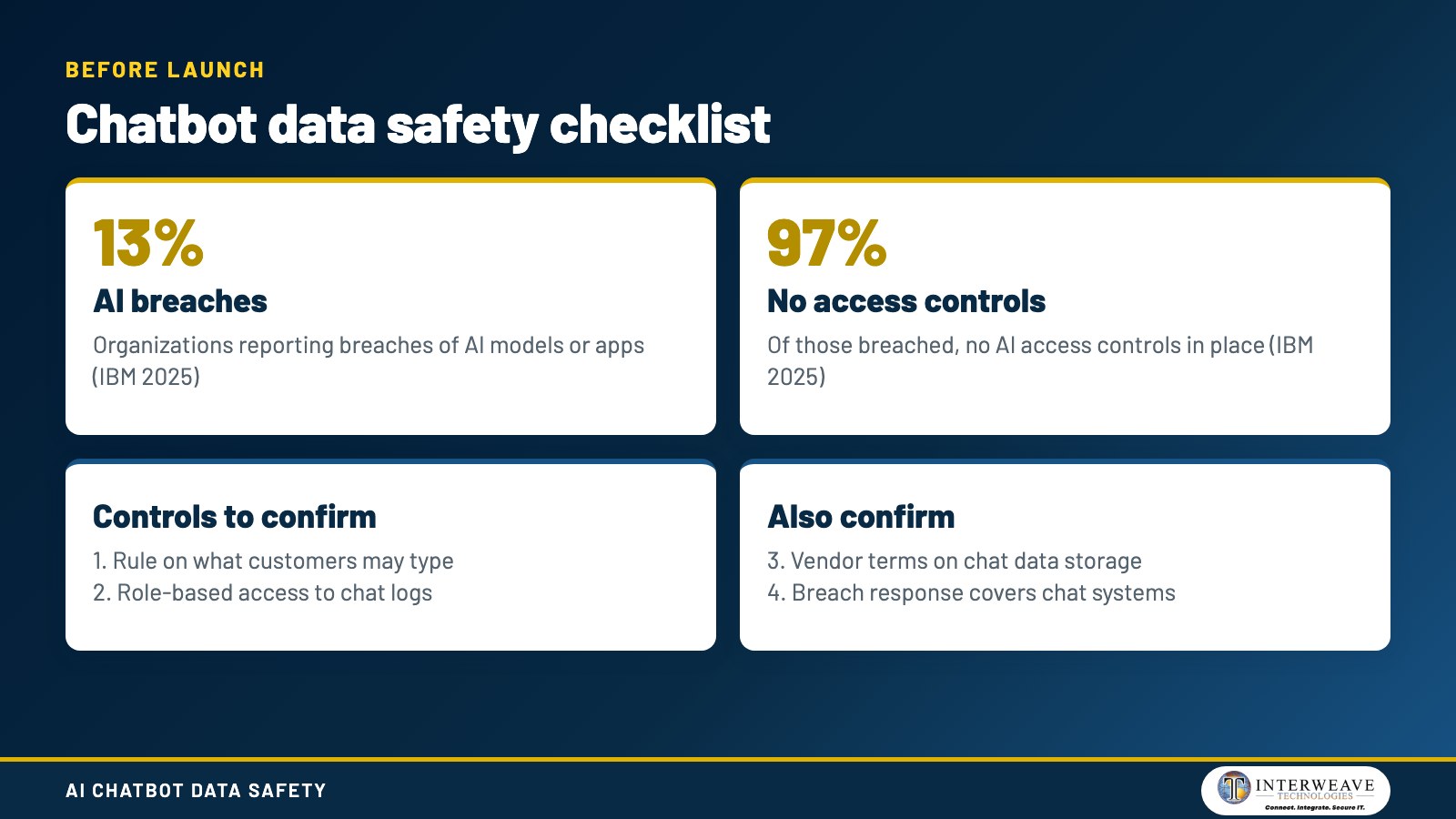
The checklist graphic lists the controls to confirm before launch, next to the IBM figures.
Can an AI Chatbot Give Wrong Answers?
Yes, an AI chatbot can give wrong answers, and the National Institute of Standards and Technology (NIST) calls this confabulation. NIST AI 600-1, published in July 2024, defines confabulation as confidently stated but erroneous or false content. Colloquially, people call it a hallucination.
Three habits lower the chance of a wrong answer. Limit the bot to approved documents. Block topics such as legal, medical, and pricing exceptions. Review failed chats every month.
The NIST AI Risk Management Framework (AI 100-1, January 2023) organizes this work into four functions: GOVERN, MAP, MEASURE, and MANAGE. A wrong answer also carries legal weight, which is the next question.
Who Is Responsible for What a Business Chatbot Says?
The business that runs the chatbot is responsible for what it tells customers. The FTC stated on September 25, 2024, that there is no AI exemption from the laws on the books. Consumer protection rules apply to chatbot claims the same way they apply to ads.
The FTC's February 2025 order against DoNotPay required $193,000 in monetary relief. The order bars the company from advertising that its service performs like a real lawyer without proof. Owners should read that as a reminder to test every claim a bot makes.
Talk to your attorney about claims specific to your industry. Some jobs still fit people better than bots, as the next section explains.
When Is an AI Chatbot Not Worth It for a Small Business?
An AI chatbot is not worth it when questions are rare, answers change daily, or many chats need judgment. A shop that gets five website questions a week gains little from a bot. A free live chat plan or a clear FAQ page costs less.
Three signs point to waiting: no written answers exist, no one owns the review, and no handoff person is named. Fix those gaps first, and the pilot has a fair chance. Measuring results then tells you whether to keep going.
How Do You Measure Whether an AI Chatbot Is Working?
Measure an AI chatbot with four numbers: chats handled without staff, handoffs to staff, leads captured, and wrong answers found. Compare each number against the goal set in step one. Review them on the same day every month.
A drop in repeated staff questions shows the bot works. A rise in handoffs on one topic shows a missing answer. A single wrong answer on pricing or policy needs a fix the same day.
Small teams can add chat metrics to the report they already read, so results stay visible beyond a vendor dashboard. Good results raise a strategy question, which the next section covers.
What Else Should You Know About AI Chatbots for Small Business?
Do You Need an AI Strategy Before a Chatbot?
No, but a short plan helps. The plan names the goal, the data the bot may use, and the owner. Teams that want a wider plan can start with AI roadmap planning and then pick the first project.
Can I Use ChatGPT for Customer Service?
A general consumer chat tool can draft replies, but it is not set up to answer customers on your behalf. A business bot needs approved sources, handoff rules, and access controls. Pasting customer data into a personal account bypasses those controls.
What Should You Not Tell an AI Chatbot?
Do not type card numbers, passwords, health details, or client secrets into a chatbot. Staff need a written rule for this. A short safe-use policy sets that rule and names who approves new tools.
Can People See What I Type Into a Chatbot?
Providers may store conversations, and staff with log access can read them. Terms differ by vendor, so read the data section of the contract. Choose a plan that lets you control retention and who can open the logs.
What Is the Safest AI Chatbot to Use?
No single product is safe by name. Safety comes from settings: limited data, role-based log access, approved sources, and a human handoff. A review of your setup shows where the gaps sit, which is part of Secure AI work.
Frequently Asked Questions
What Capability Does Generative AI Provide to Chatbots During Customer Interactions?
Generative AI lets a chatbot write natural replies to questions it was not scripted for. The bot reads the question, finds matching text in approved sources, and composes an answer. Handoff rules still apply when the answer is unclear.
How Can AI Improve Customer Service?
AI improves customer service by answering routine questions quickly and passing complex cases to people with the chat history attached. Staff then spend time on problems that need judgment. Chat logs also show which questions customers ask repeatedly.
How Long Does an AI Chatbot Take to Set Up?
A first pilot fits a 30-day plan: one week to gather answers, one to build and test, two to run. Larger projects that connect a CRM or calendar take longer. Scope sets the timeline.
Does a Chatbot Need a Website?
A chatbot needs a channel, and a website is the simplest one. Other channels include text messaging and social messaging. Start with one channel so review stays manageable.
How Does Interweave Technologies Help Small Businesses Plan an AI Chatbot?
Interweave Technologies helps small businesses plan, build, and secure an AI chatbot that fits one goal. We start with the questions your staff repeat, the data the bot may use, and the handoff owner. The team covers AI readiness review items before any content is loaded.
We also connect the bot to your security plan, from access controls to incident response. A free scoping conversation covers the goal, the data, and the pilot scope for businesses in North Alabama and beyond. Call (256) 837-2300 to start that conversation.
Owners ready to scope a pilot can review chatbot services for a first project. A short pilot with one goal, one channel, and one owner shows the value before any wider rollout begins.
Teams that want a wider security and IT review can ask Interweave Technologies about managed IT, cybersecurity, and compliance alongside Secure AI.





Share Post