

Interweave Technologies

November 15, 2026

12 min
How Does an Access Control System Work for a Business?

An access control system works in five steps. A person presents a credential, a reader passes it on, and a controller checks permissions. The lock then opens or stays shut, and software logs the event. That sequence answers how does access control system work at every door. NIST SP 800-171 Rev 3 requirement 03.10.07 calls for physical access audit logs.
Key Takeaways
- Five parts make a door system: credential, reader, controller, lock, and management software.
- The controller, not the reader, decides whether a door opens, and it logs every attempt.
- Access models set the rules: discretionary (DAC), mandatory (MAC), role-based (RBAC), and attribute-based (ABAC).
- NIST SP 800-171 Rev 2 requirement 3.10.4 and HIPAA 164.310 tie access control to audit logs and facility protection.
- Cloud and on-premises systems follow the same flow and differ in where the software runs.
How Does an Access Control System Work at a Business Door?
An access control system works by checking each credential against stored permissions before a door unlocks. A reader at the door captures the credential, a controller compares it with the permission database, and the controller signals the lock. Software then records the result.
A business gains a record of every entry plus control by door, time, and person. Our team installs access control solutions that follow this flow. The same flow drives the five steps that follow.
What Is an Access Control System?
An access control system is a security setup that decides who may enter a space and records each attempt. It replaces metal keys with credentials, readers, and software. The what is access control system question has the same answer for an office, clinic, or plant.
Door keys offer no such record, and a lost key stays valid until the lock is changed. Software-based permissions end that gap, because an administrator removes a credential in seconds. The next section breaks how does access control system work into five steps.
What Are the 5 Steps of Access Control?
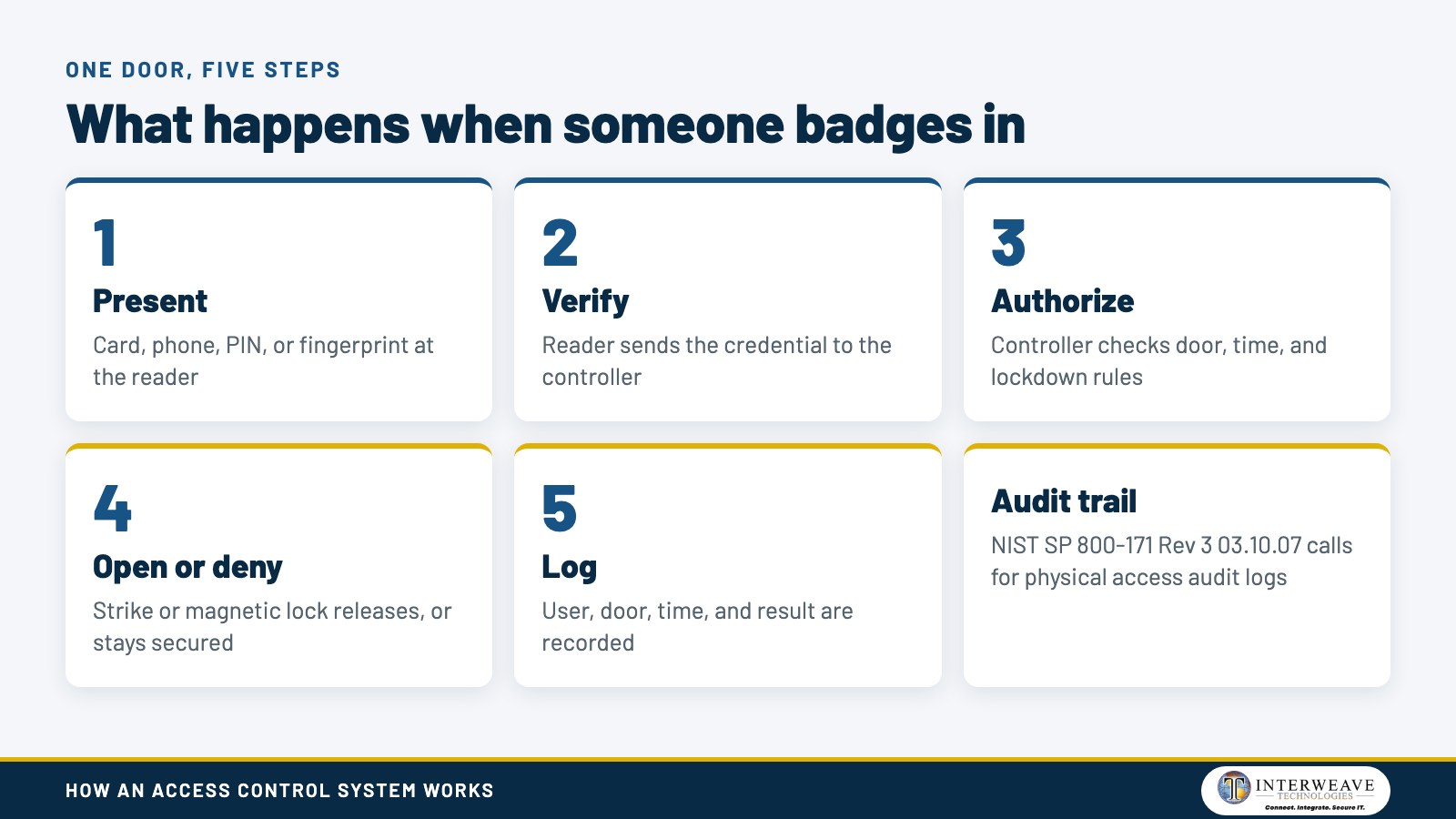
The five steps of access control are presentation, verification, authorization, door action, and logging. Each step hands data to the next, and the whole sequence finishes in a moment. The ordered list below shows the sequence at one door.
- Presentation: the user taps a card, scans a phone, enters a PIN, or offers a fingerprint at the reader.
- Verification: the reader sends the credential data to the controller, which confirms the credential is valid.
- Authorization: the controller checks the user's permissions for that door, that time, and any active lockdown.
- Door action: the controller sends a signal that releases the lock, or it keeps the lock secured.
- Logging: the software records the user, door, time, and result for reports and audits.
Some vendors add a sixth action, request-to-exit, so people leave without a credential. The graphic below shows the five steps as one sequence.
Every step depends on hardware and software working as a set. The next section names those parts.
What Are the Main Components of an Access Control System?
The main components of an access control system are credentials, readers, controllers, locks, and management software. Credentials identify the person. Readers capture the credential, controllers decide, locks secure the door, and software manages users and records events.
| Component | Job | Examples |
|---|---|---|
| Credential | Identifies the person | Card, fob, phone, PIN, fingerprint |
| Reader | Captures and forwards credential data | Proximity, keypad, biometric reader |
| Controller | Checks permissions and decides | Standalone or networked panel |
| Lock hardware | Secures or releases the door | Electric strike, magnetic lock |
| Software | Manages users, schedules, and logs | On-premises or cloud platform |
The table shows that only the controller holds the decision logic. Readers are simple devices, so a stolen reader reveals no permissions. Credentials come in several forms, covered next.
What Are Examples of Access Control?
An example of access control system use is an employee tapping a phone on a wall reader. The controller then opens the door. Other examples are keypad PINs, key fobs, and fingerprint scanners.
- Key cards and fobs use radio frequency identification (RFID) to send an ID number to the reader.
- Mobile credentials use Bluetooth or near-field communication (NFC) from a smartphone.
- PIN codes are entered on a keypad, alone or paired with a card.
- Biometric credentials use a fingerprint, face, or iris scan.
Mixed credentials work on one system. A server room can require a card plus a PIN, while the front door takes a card alone. Mobile credentials also suit contractors and visitors, because access rights can expire automatically. Door hardware comes next.
How Does a Door Access Control System Work for a Business?
A door access control system for business works when the controller signals an electric strike or magnetic lock. An electric strike releases the latch. A magnetic lock holds the door shut with an electromagnet and releases when power is cut.
Door sensors complete the picture. This flow is what buyers mean when they ask how does access control system work for a business. A door position sensor reports whether the door is closed, and a request-to-exit sensor lets people leave without a credential. Businesses that want door access installation receive these parts as one design. The controller logs forced or propped doors as events.
Wiring matters because readers and controllers need power and a network path. Reliable network wiring carries that traffic back to a central closet. Rules for who may pass through each door come from the access model, which the next section explains.
What Are the Three Main Types of Access Control?
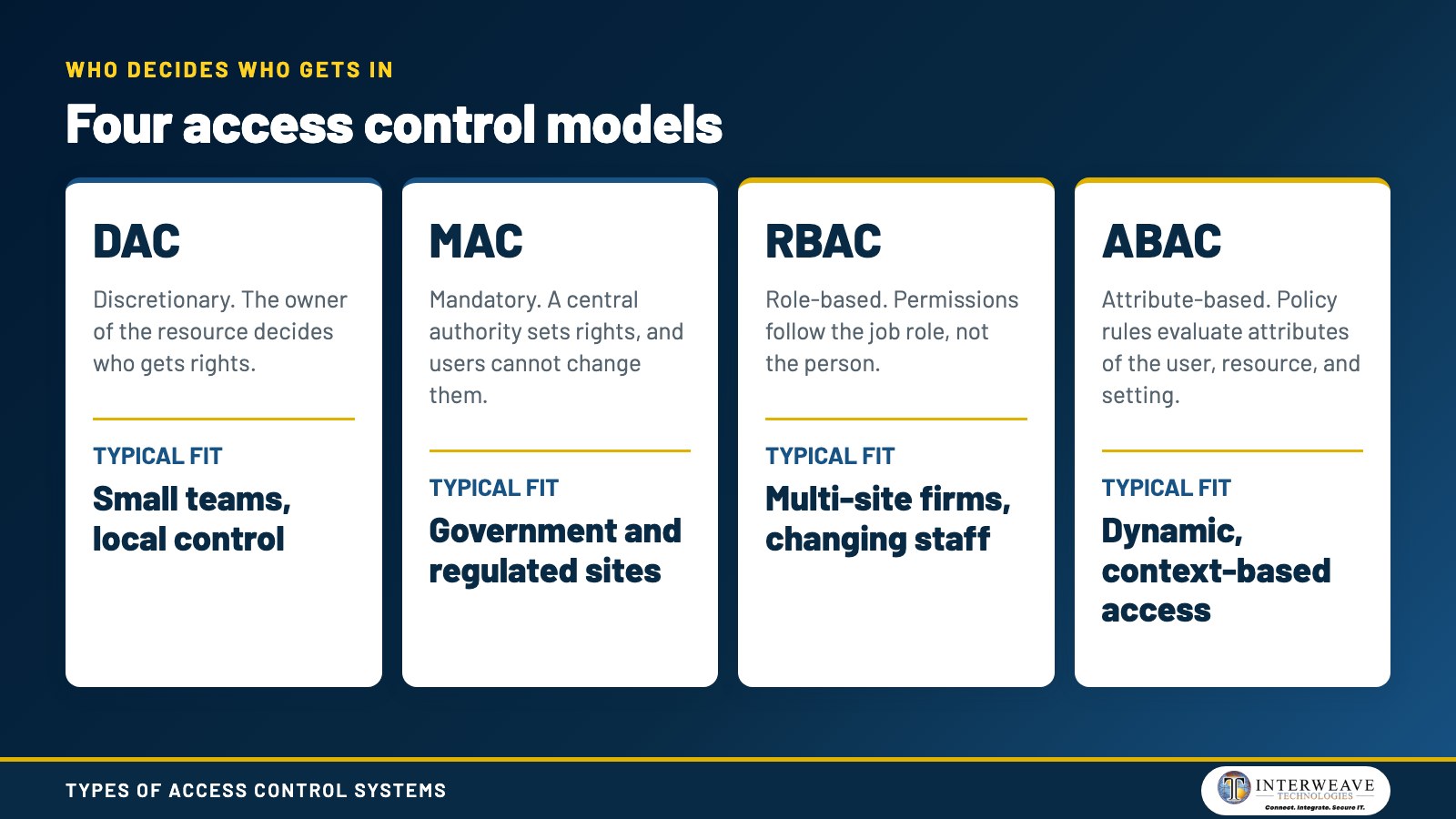
The three main types of access control systems are discretionary (DAC), mandatory (MAC), and role-based (RBAC). Attribute-based access control (ABAC) is a fourth model many guides add. The National Institute of Standards and Technology (NIST) defines each model in its glossary.
NIST says DAC leaves access to the discretion of the object's owner, who decides who gets rights. NIST says MAC decisions come from a central authority, and users cannot change rights. NIST says RBAC ties permitted actions to roles instead of individual identities.
| Model | Who decides | Typical fit |
|---|---|---|
| DAC | The owner of the resource | Small teams, local control |
| MAC | A central authority and labels | Government and regulated sites |
| RBAC | Job role | Multi-site firms with changing staff |
| ABAC | Policy rules on attributes | Dynamic, context-based access |
The table shows the main difference: who holds the authority to grant access. RBAC suits offices with changing staff because one role change updates every door that role covers. Our guide to role-based access control covers it in depth.
NIST's RBAC project records that David Ferraiolo and Rick Kuhn formalized RBAC in 1992. It was later adopted as an American National Standards Institute (ANSI) standard in 2004. Models set the rules, and a separate rule sets the baseline for every user, covered next.
What Is the Rule in Access Control?
The core rule in access control is to give each person only the access needed for their duties. The Federal Trade Commission (FTC) Safeguards Rule, 16 CFR 314.4(c)(1), states this directly. It requires limiting authorized users' access to the information they need to perform their duties.
Security teams call this principle least privilege. A warehouse worker receives the warehouse door and no server room access. The HIPAA Security Rule uses the same idea, requiring procedures that validate access based on a person's role or function.
Least privilege only works when permissions are removed on time. NIST SP 800-171 Rev 3 requirement 03.10.01 says to remove people from the facility access list once access is no longer required. Security level then depends on how credentials are combined.
What Is the Most Secure Method of Access Control?
The most secure method of access control combines two or more factors, such as a card plus a PIN. Layering factors means one stolen credential cannot open a door alone. Server closets suit this layered approach.
Digital systems follow the same logic. The Cybersecurity and Infrastructure Security Agency (CISA) states that multi-factor authentication (MFA) makes you 99% less likely to be hacked. Door systems use the same idea with physical credentials.
Biometrics tie access to a trait that cannot be lent. Each added factor also adds cost and a slower entry, so businesses match the method to the room. Where the system software runs is the next choice.
How Does Cloud Based Access Control Work?
Cloud based access control works by hosting the management software online while local controllers still decide at each door. An administrator signs in through a browser or app to add users, change schedules, and read logs. The controller then receives the updated permissions.
On-premises software runs on a server inside the building and suits sites that need local data control. A hybrid design mixes both. The comparison below lists the practical differences.
- Cloud: remote administration across many sites, plus automatic permission syncing.
- On-premises: data stays on local servers, and the business maintains the server.
- Hybrid: local control with cloud features such as visitor management or remote monitoring.
Networked controllers can keep making decisions during a network outage, though they depend on the server for setup. Plan for that dependency when choosing a design. Smaller offices have their own scale questions, covered next.
What Is the Right Access Control System for a Small Business?
An access control system for small business starts with a few doors, one controller, card or mobile credentials, and cloud management. Small sites need the same five components as large ones. They simply buy fewer readers and avoid an on-site server.
Plan for growth when choosing hardware. Systems built on open standards let a business add doors, users, or sites later without replacing readers. Review these entry control advantages before settling on a scope.
Budget covers more than readers. Software licensing, credential issuance, and support all add cost, so request a full breakdown from any vendor. Compliance rules shape the design too, as the next section shows.
What Standards and Rules Apply to Access Control?
The standards that apply to access control depend on your industry. Government contractors follow NIST SP 800-171, healthcare practices follow HIPAA, and financial firms follow the FTC Safeguards Rule. Each one addresses physical or logical access in its own words.
NIST SP 800-171 Rev 2 requirement 3.10.1 says to limit physical access to authorized individuals. Requirement 3.10.4 says to maintain audit logs of physical access. Requirement 3.10.5 says to control and manage physical access devices, which include card readers. Contractors handling Controlled Unclassified Information (CUI) can review CUI facility protection for the full picture.
Rev 3 consolidates these into requirement 03.10.07, which calls for controlling ingress and egress with physical access control systems, devices, or guards. It also states that audit logs can be procedural, automated, or a combination. As of November 2026, confirm with your compliance advisor or assessor which revision your contract cites.
HIPAA 45 CFR 164.310(a)(1) requires facility access controls that limit physical access to electronic information systems while allowing authorized access. Practices can read about HIPAA compliance support for medical offices.
The FTC Safeguards Rule adds that financial firms must identify and manage facilities by their relative importance, under 16 CFR 314.4(c)(2). Firms in that sector can review Safeguards Rule compliance help.
This article is general education and not legal advice. Talk to your compliance advisor, attorney, or assessor about your obligations. The graphic below summarizes the four models and where they fit.
How Do Visitors and Contractors Get Access?
Visitors and contractors get access through temporary credentials that expire on a set date or time. An administrator issues a mobile pass, a short-term card, or a PIN for one door group. The credential stops working without any retrieval.
NIST SP 800-171 Rev 3 requirement 03.10.07 adds that organizations escort visitors and control visitor activity. Temporary credentials support that duty, because the log shows where each visitor went. Escorts remain a human control that the software cannot replace.
Expiring credentials also reduce clean-up work for staff who handle cleaning crews, vendors, and delivery drivers. Every temporary pass still appears in the same audit trail as employee badges. Those trails are the subject of the next section.
How Do Logs and Audit Trails Support Security?
Logs and audit trails support security by recording the user, door, time, and result of every entry attempt. Reports from these records help investigate incidents and prove compliance. NIST SP 800-171 Rev 2 requirement 3.10.4 makes physical access logs a stated requirement.
Good logs also show patterns, such as repeated denied attempts at one door. Review them on a schedule, and keep them as long as your rules require. HIPAA documentation, for example, must be retained for 6 years under 164.316.
HIPAA 164.310(a)(2)(iv) adds that repairs to locks, doors, and walls tied to security must be documented. Records of this kind link the physical system to your wider IT program. Several side questions follow.
What Else Should You Know About Access Control Systems?
Can You Explain Access Control in a Simple Way?
Access control is a system that decides who may enter a place and records every attempt. A credential proves identity, and stored rules decide the outcome. Think of it as a door that checks a list before opening.
What Is the Main Purpose of Access Control?
The main purpose of access control is to let authorized people in and keep others out. It also creates a record of entry for audits. Our overview of access control practices covers daily use.
What Is Another Word for Access Control?
Another word for access control is entry control, or physical access control for doors. Security teams also say authorization and admission control. In IT, the same idea appears as identity and access management.
What Is the Standard for Access Control?
No single standard covers every business. NIST SP 800-171 and SP 800-53 describe controls for government work. HIPAA covers healthcare facilities, and the FTC Safeguards Rule covers financial firms. Choose the standard your contract names.
How Many Doors Should Be Controlled?
Controlled doors should cover every entrance to the building and every room that holds sensitive systems or records. Start with the exterior doors, server rooms, records rooms, and supply areas. A risk assessment sets the final list of doors.
Does Access Control Work With Cameras?
Yes, access control pairs with video, so a door event links to footage. Our video surveillance basics post explains the camera side. Together they show who opened a door and what happened next.
Frequently Asked Questions
Can an Access Control System Work Without Internet?
Yes, a networked controller keeps deciding at the door during an outage. It relies on the server for configuration and setup. Cloud management and remote changes pause until the connection returns.
What Happens to Doors During a Power Failure?
A magnetic lock is fail-safe, so the door unlocks when power is lost. An electric strike can be built to fail secure or fail safe. The choice depends on life safety rules and local fire codes.
How Do You Remove Access When an Employee Leaves?
An administrator disables the user's credential in the management software, and the change reaches every door. This takes seconds, with no rekeying. The disabled credential then appears in logs if anyone tries it.
How Does Interweave Technologies Help Businesses With Access Control Systems?
Access control planning starts with a door list and a permission plan. Our team at Interweave Technologies designs, installs, and supports door access control for businesses in North Alabama and the Southeast.
We connect readers, controllers, cabling, and cameras into one design that fits your doors and compliance needs. Physical and digital controls then follow one plan, with Secure IT cybersecurity covering the network side.
To review your doors, call (256) 837-2300. A scoping conversation covers door counts, credential types, camera pairing, and the contract rules that apply to your sites. Our business entry systems team can scope a design with you.






Share Post